VRChatのワールド更新ができなくなって、解決したお話
みなさん、VRChatやってますでしょうか?
わたしは全然やっていません。なんで?
さて、先日自分で作ったワールドを更新しよう!
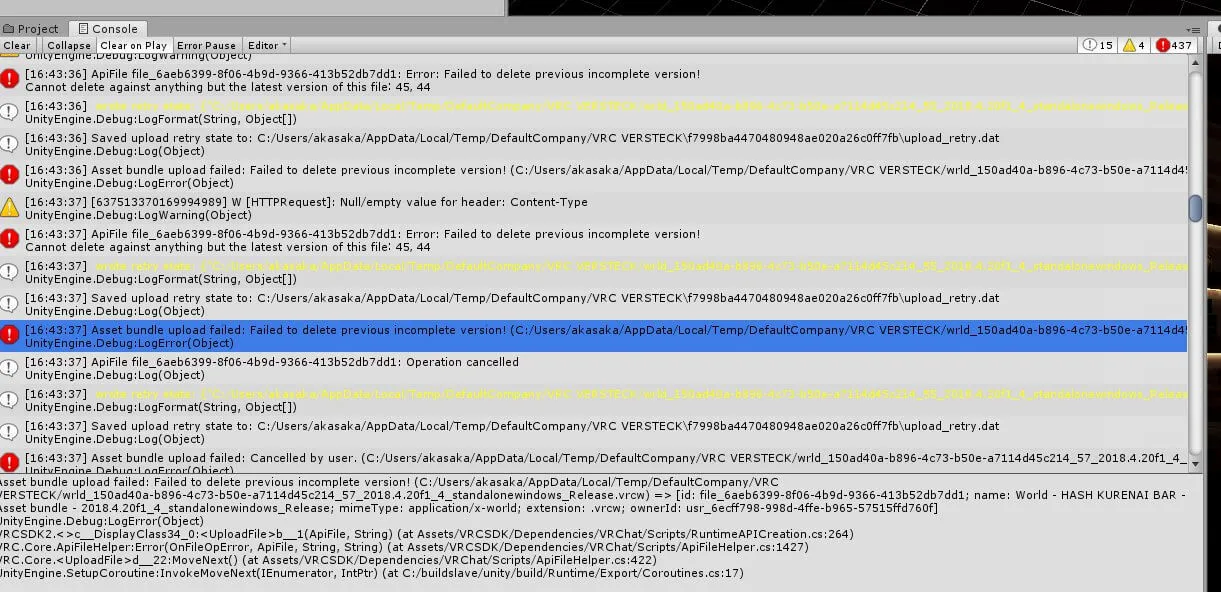
と思ったときに、以下のようなエラーを吐き続けたんですよね……

Asset bundle upload failed: Failed to delete previous incomplete version! ってエラー、よくわからないけどVRChatのサーバー側が正常に戻るまで放置って感じですかねえ…… ちょっと夜になったら、弄ったワールドを再度アップしますわ

で、最初に出てきた下記の対応策(SDKの更新)をしてみましたが、特に変わらず……
https://help.vrchat.com/hc/en-us/articles/1500002378982-My-upload-failed
次に思いついたのが、2バイト文字を含まないディレクトリ変更。
が、これも変わらず(そもそも今まで更新できてたので関係ないと思うんですわ!)
VRChatサポートに助けを求める
もうどうしようもない!と思ったのでVRChatのサポートに助けを求めることにしました。
が、ここで1つトラップ。
VRChatのアカウントではログインできないので、アカウントの作成が必要です。
またVRChatで利用してるメールアドレスと同じじゃないとダメです!!!
VRChatのサポートするとき、サポート用のアカウントを作らないとダメ。 またVRChatのアカウントと同じメールアドレスを利用しないとダメ。1敗。

で、アカウントを作成したらSubmit a requestから問い合わせをしましょう!
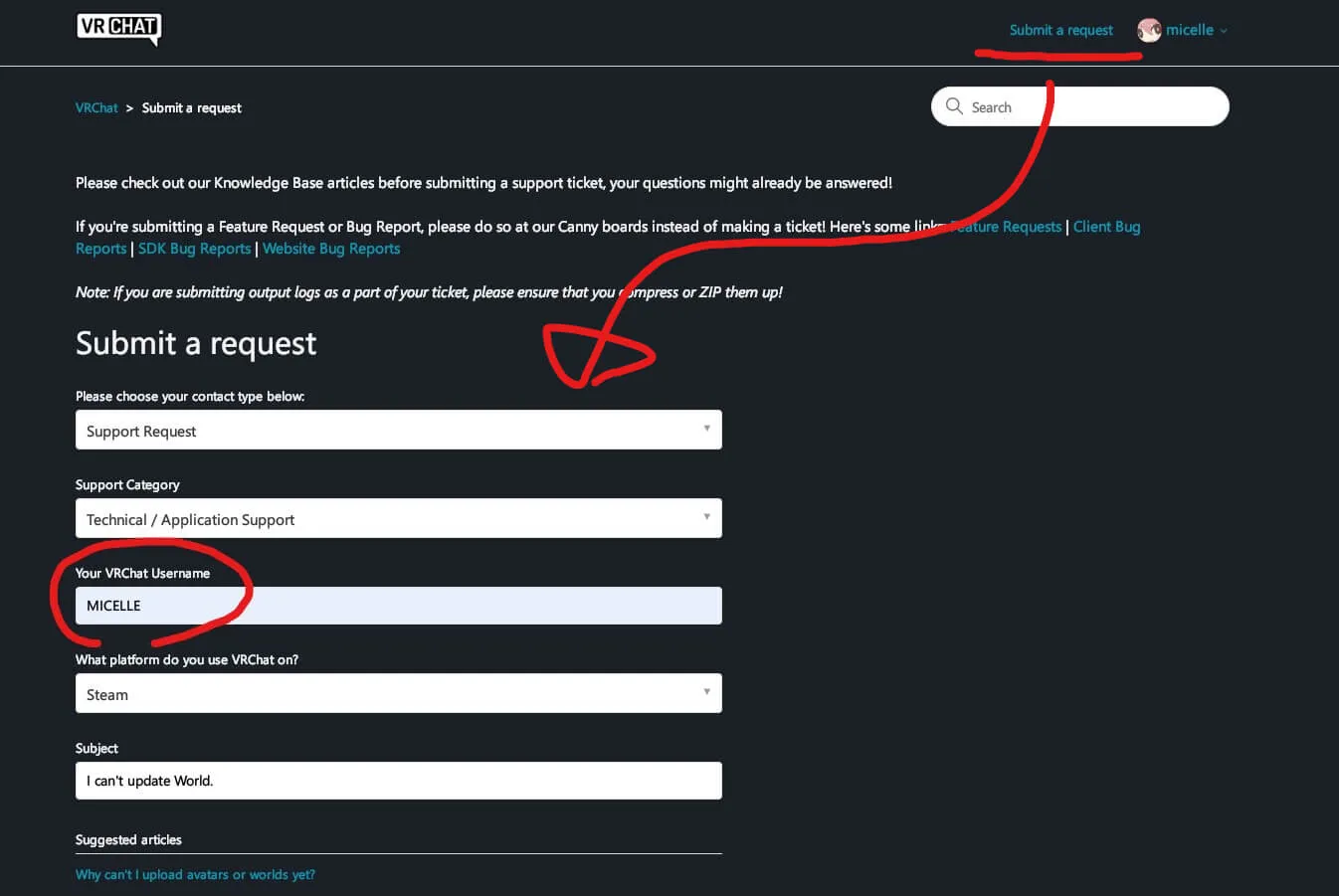
内容は基本的に英語で書いた方が良いと思うよ。
私は英語ニガテなのでまずは日本語で書いて、続けて英語でも説明を書いたよ。
あとUnityのバージョンと、SDKのバージョン、そしてワールドのURLも記載したよ。これないとサポートはちんぷんかんぷんだからね。必須だと思うよ。しらんけど。
(私はお仕事でバージョンとか書かない人は地獄に落ちろって思ってるよ。生きる価値ないもんね。)
Unity2018.4.20f1
VRC SDK2021.03.09.13.58
Worldhttps://vrchat.com/home/world/wrld_150ad40a-b896-4c73-b50e-a7114d45c214[JP]
1. VRChat SDKの”Build&Publish for Windows”をクリック。
2. UnityのGameViewに表示された”Upload”をクリック。
3. “Uploading Asset bundle…”というウィンドウが表示される。
4. 以下のエラーログが延々と表示されアップロードが完了しない。[EN]
1. click “Build&Publish for Windows” in the VRChat SDK.
2. click “Upload” in Unity’s GameView.
3. a window that “Uploading Asset bundle…” will appear.
4. the following error log is displayed and the upload is not completed.--------------------------------------------------------
(Object)
[637514285418092480] W [HTTPRequest]: Null/empty value for header: Content-Type
UnityEngine.Debug
BestHTTP.Logger.DefaultLogger(String, String)
BestHTTP.<>c__DisplayClass237_0:<SendHeaders>b__0(String, List`1)
BestHTTP.HTTPRequest(OnHeaderEnumerationDelegate, Boolean)
BestHTTP.HTTPRequest(Stream)
BestHTTP.HTTPRequest(Stream)
BestHTTP.HTTPConnection()
BestHTTP.PlatformSupport.Threading.<>c__DisplayClass4_0:<RunLongLiving>b__0(Object)
System.Threading.ThreadHelper(Object)--------------------------------------------------------
(Object)
ApiFile file_6aeb6399-8f06-4b9d-9366-413b52db7dd1: Error: Failed to delete previous incomplete version!
Cannot delete against anything but the latest version of this file˸ 45‚ 44
UnityEngine.Debug
VRC.Core.ApiFileHelper(OnFileOpError, ApiFile, String, String) (at Assets/VRCSDK/Dependencies/VRChat/Scripts/ApiFileHelper.cs)
VRC.Core.<UploadFile>d__22() (at Assets/VRCSDK/Dependencies/VRChat/Scripts/ApiFileHelper.cs)
UnityEngine.SetupCoroutine(IEnumerator, IntPtr) (at C:/buildslave/unity/build/Runtime/Export/Coroutines.cs)--------------------------------------------------------
(String, Object[])
<color=yellow>wrote retry state: {“C:/Users/akasaka/AppData/Local/Temp/DefaultCompany/VRC VERSTECK/wrld_150ad40a-b896-4c73-b50e-a7114d45c214_60_2018.4.20f1_4_standalonewindows_Release.vrcw”:“file_6aeb6399-8f06-4b9d-9366-413b52db7dd1”, “C:/Users/akasaka/AppData/Local/Temp/DefaultCompany/VRC VERSTECK/wrld_150ad40a-b896-4c73-b50e-a7114d45c214_61_2018.4.20f1_4_standalonewindows_Release.vrcw”:“file_6aeb6399-8f06-4b9d-9366-413b52db7dd1”, “C:/Users/akasaka/AppData/Local/Temp/DefaultCompany/VRC VERSTECK/wrld_150ad40a-b896-4c73-b50e-a7114d45c214_63_2018.4.20f1_4_standalonewindows_Release.vrcw”:“file_6aeb6399-8f06-4b9d-9366-413b52db7dd1”}</color>
UnityEngine.Debug
VRCSDK2.RuntimeAPICreation() (at Assets/VRCSDK/Dependencies/VRChat/Scripts/RuntimeAPICreation.cs)
VRCSDK2.RuntimeAPICreation(String, String) (at Assets/VRCSDK/Dependencies/VRChat/Scripts/RuntimeAPICreation.cs)
VRCSDK2.<>c__DisplayClass34_0:<UploadFile>b__1(ApiFile, String) (at Assets/VRCSDK/Dependencies/VRChat/Scripts/RuntimeAPICreation.cs)
VRC.Core.ApiFileHelper(OnFileOpError, ApiFile, String, String) (at Assets/VRCSDK/Dependencies/VRChat/Scripts/ApiFileHelper.cs)
VRC.Core.<UploadFile>d__22() (at Assets/VRCSDK/Dependencies/VRChat/Scripts/ApiFileHelper.cs)
UnityEngine.SetupCoroutine(IEnumerator, IntPtr) (at C:/buildslave/unity/build/Runtime/Export/Coroutines.cs)--------------------------------------------------------
(Object)
Saved upload retry state to: C:/Users/akasaka/AppData/Local/Temp/DefaultCompany/VRC VERSTECK\f7998ba4470480948ae020a26c0ff7fb\upload_retry.dat
UnityEngine.Debug
VRCSDK2.RuntimeAPICreation() (at Assets/VRCSDK/Dependencies/VRChat/Scripts/RuntimeAPICreation.cs)
VRCSDK2.RuntimeAPICreation(String, String) (at Assets/VRCSDK/Dependencies/VRChat/Scripts/RuntimeAPICreation.cs)
VRCSDK2.<>c__DisplayClass34_0:<UploadFile>b__1(ApiFile, String) (at Assets/VRCSDK/Dependencies/VRChat/Scripts/RuntimeAPICreation.cs)
VRC.Core.ApiFileHelper(OnFileOpError, ApiFile, String, String) (at Assets/VRCSDK/Dependencies/VRChat/Scripts/ApiFileHelper.cs)
VRC.Core.<UploadFile>d__22() (at Assets/VRCSDK/Dependencies/VRChat/Scripts/ApiFileHelper.cs)
UnityEngine.SetupCoroutine(IEnumerator, IntPtr) (at C:/buildslave/unity/build/Runtime/Export/Coroutines.cs)--------------------------------------------------------
(Object)
Asset bundle upload failed: Failed to delete previous incomplete version! (C:/Users/akasaka/AppData/Local/Temp/DefaultCompany/VRC VERSTECK/wrld_150ad40a-b896-4c73-b50e-a7114d45c214_63_2018.4.20f1_4_standalonewindows_Release.vrcw) => [id: file_6aeb6399-8f06-4b9d-9366-413b52db7dd1; name: World - HASH KURENAI BAR - Asset bundle - 2018․4․20f1_4_standalonewindows_Release; mimeType: application/x-world; extension: .vrcw; ownerId: usr_6ecff798-998d-4ffe-b965-57515ffd760f]
UnityEngine.Debug
VRCSDK2.<>c__DisplayClass34_0:<UploadFile>b__1(ApiFile, String) (at Assets/VRCSDK/Dependencies/VRChat/Scripts/RuntimeAPICreation.cs)
VRC.Core.ApiFileHelper(OnFileOpError, ApiFile, String, String) (at Assets/VRCSDK/Dependencies/VRChat/Scripts/ApiFileHelper.cs)
VRC.Core.<UploadFile>d__22() (at Assets/VRCSDK/Dependencies/VRChat/Scripts/ApiFileHelper.cs)
UnityEngine.SetupCoroutine(IEnumerator, IntPtr) (at C:/buildslave/unity/build/Runtime/Export/Coroutines.cs)--------------------------------------------------------
で、Unityのエラーが写ったスクリーンショットも添付しておこうね。
テキストだけじゃUnity上でどういう感じにエラーが出てるかわかんないもんね。
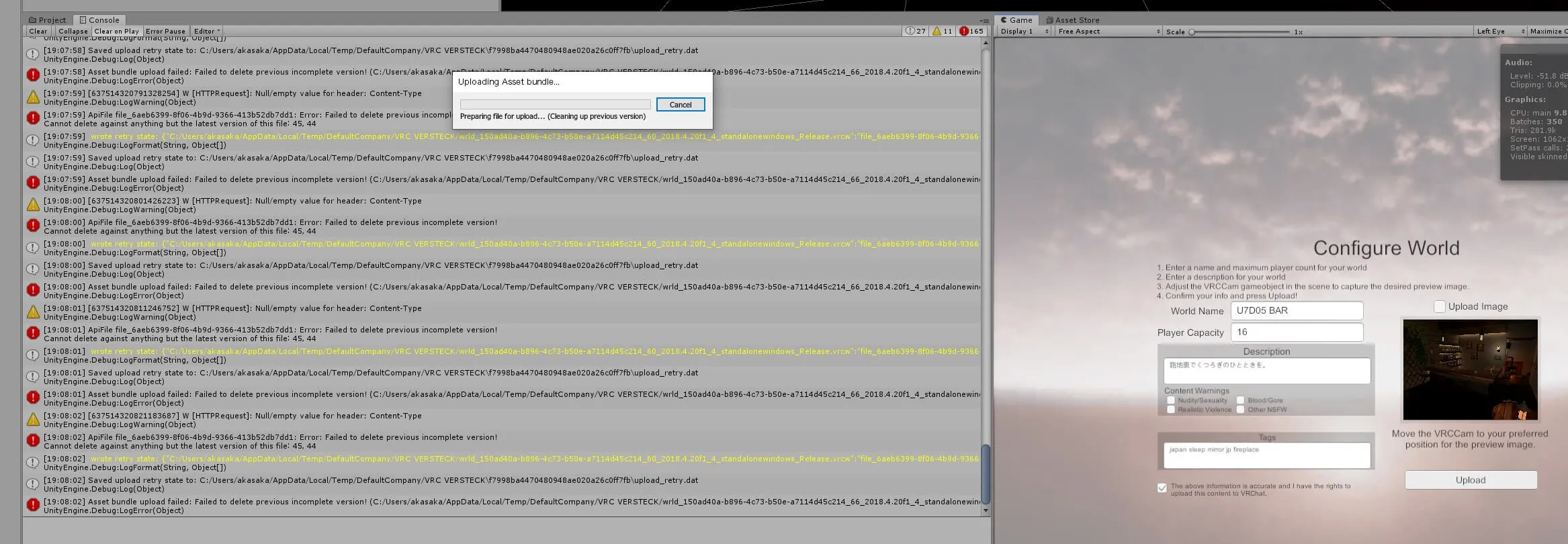
最後にUnityが保存してくれたログも提出しようね。
C:\Users\NAME\AppData\Local\Unity\Editorに存在するEditor.logだよ。
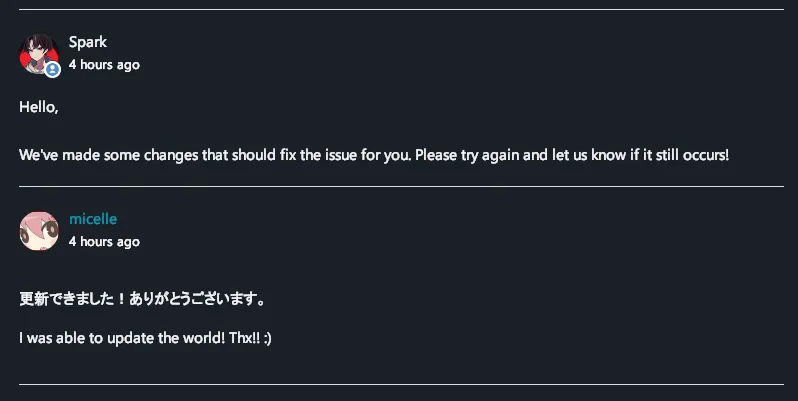
で、これらを提出したら対応した報告が来るまでお茶でも飲んでましょう。
メモ
たぶんあそこまで詳しい情報は不要だったかもしれません。
サポートにとってはああ、いつものやつかみたいな。
でも備えあれば憂いなしって言うし、困ることはないので丁寧に質問を投げると良いですよ。
(主にサポートする側がとても楽になるし嬉しい限りです)